How MCP Servers Use Your Context Window
MCP gets blamed for eating context windows, but the protocol itself uses zero tokens. This article shows exactly where tokens are consumed—with a step-by-step demo that traces 120,000 tokens through a simple two-tool workflow.
Introduction
"MCP is a context hog."
If you've spent any time in developer communities discussing Model Context Protocol, you've probably seen this complaint. Developers connect a few MCP servers to their AI agent, check their token usage, and wonder why they're burning through context before asking a single question.
Here's the thing: they're blaming the wrong culprit.
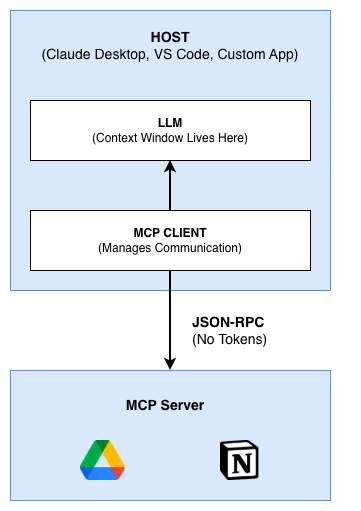
MCP itself consumes zero tokens. The protocol is just JSON-RPC 2.0 messages traveling between your application and MCP servers. That transport layer doesn't touch your LLM's context window at all.
So where do the tokens actually go?
They're consumed when your MCP client loads tool definitions into the LLM's context, and again when tool results get injected back. The protocol is innocent. The implementation choices are what cost you.
This article breaks down the technical flow. You'll see exactly where tokens enter the picture, follow a step-by-step counting demo through a real workflow, and understand why some setups consume 100x more tokens than others for the same task.
If you're looking for cost analysis and team-level solutions, check out our companion article: MCP Token Limits: The Hidden Cost of Tool Overload. This piece focuses on the mechanics—how it actually works under the hood.
MCP Architecture: Three Layers, One LLM
Before we trace token consumption, let's establish how MCP components interact. The architecture has three participants:
Host
The LLM application that initiates everything. This is Claude Desktop, VS Code with an AI extension, or any application embedding an AI model. The host is where your LLM lives and where your context window exists.
Client
A connector inside the host application that manages MCP communication. The client handles the protocol details—connecting to servers, sending requests, receiving responses. One host can run multiple clients, each talking to different MCP servers.
Server
A service providing capabilities to the AI. Servers expose three types of features:
- Tools: Executable functions (query a database, send an email, read a file)
- Resources: Data and context (documents, API responses, configuration)
- Prompts: Templated messages and workflows
The Transport Layer
MCP uses JSON-RPC 2.0 for all communication. This is the same protocol pattern used by the Language Server Protocol (LSP) that powers IDE features like autocomplete.
When your client talks to a server, it's sending JSON messages over stdio or HTTP. Here's what a tool call looks like on the wire:
{
  "jsonrpc": "2.0",
  "id": 1,
  "method": "tools/call",
  "params": {
    "name": "gdrive.getDocument",
    "arguments": {
      "documentId": "abc123"
    }
  }
}
And the response:
{
  "jsonrpc": "2.0",
  "id": 1,
  "result": {
    "content": [
      {
        "type": "text",
        "text": "Meeting notes from Q4 planning..."
      }
    ]
  }
}
This JSON transport consumes zero LLM tokens. It's just data moving between processes. The LLM never sees these messages directly.
So where does the LLM fit in? The client sits between the LLM and the servers. It translates LLM decisions into MCP calls and MCP results back into LLM context. That translation is where tokens enter the picture.
Where Tokens Are Actually Consumed
Let's trace through a complete MCP interaction and mark exactly where tokens get counted. The distinction matters: some steps are free, others are expensive.
The Complete Flow
User types a prompt
    │
    ▼
┌─────────────────────────────────────────────┐
│  LLM CONTEXT WINDOW                         │
│  ─────────────────                          │
│  ✦ System prompt          → TOKENS (346)    │
│  ✦ Tool definitions       → TOKENS (varies) │
│  ✦ User prompt            → TOKENS          │
│  ✦ Conversation history   → TOKENS          │
└─────────────────────────────────────────────┘
    │
    ▼
LLM generates tool call decision
    │                        → TOKENS (output)
    ▼
┌─────────────────────────────────────────────┐
│  MCP CLIENT                                 │
│  ──────────                                 │
│  Intercepts tool call, formats JSON-RPC     │
└─────────────────────────────────────────────┘
    │
    ▼
┌─────────────────────────────────────────────┐
│  JSON-RPC TRANSPORT                         │
│  ──────────────────                         │
│  Client → Server request   → NO TOKENS      │
│  Server executes tool      → NO TOKENS      │
│  Server → Client response  → NO TOKENS      │
└─────────────────────────────────────────────┘
    │
    ▼
┌─────────────────────────────────────────────┐
│  MCP CLIENT                                 │
│  ──────────                                 │
│  Receives result, injects into context      │
└─────────────────────────────────────────────┘
    │
    ▼
┌─────────────────────────────────────────────┐
│  LLM CONTEXT WINDOW                         │
│  ─────────────────                          │
│  ✦ Previous context       → TOKENS          │
│  ✦ Tool result injected   → TOKENS (big!)   │
└─────────────────────────────────────────────┘
    │
    ▼
LLM generates response
                             → TOKENS (output)
What Costs Tokens
System prompt: Anthropic injects a hidden prompt teaching the model how to use tools. For Claude Sonnet 4.5, this costs 313-346 tokens on every tool-enabled request. You don't see it, but you pay for it.
Tool definitions: Every tool available to the LLM must be described in the context. This includes the tool name, description, and full input schema. A single tool can cost 50-300 tokens depending on complexity.
User prompt and history: Your actual conversation, including all previous messages, tool calls, and results.
Tool results: When a tool returns data, that entire result gets injected into the LLM's context. A 50,000-token document comes back? That's 50,000 tokens added to your context.
LLM outputs: Every token the model generates—tool calls, reasoning, responses—counts as output tokens (typically priced 3-5x higher than input).
What's Free
JSON-RPC transport: Messages between client and server are just data. The LLM never processes them.
Server-side execution: Whatever the MCP server does internally—database queries, API calls, file operations—happens outside the LLM's context.
The key insight: The transport layer is essentially free. The expensive part is everything that touches the LLM's context window. Understanding this distinction is the first step to optimizing your MCP setup.
Token Counting Demo: A Real Workflow
Let's walk through a concrete example. We'll count tokens at each step to see how they accumulate.
The task: "Download the meeting transcript from Google Drive and attach it to the Salesforce lead."
Simple enough—two tool calls. But watch the numbers.
Setup: Before the User Asks Anything
The conversation hasn't started yet, but tokens are already being consumed:
┌─────────────────────────────────────────────────────────┐
│  INITIAL CONTEXT LOAD                                   │
├─────────────────────────────────────────────────────────┤
│  System prompt (tool instructions)     346 tokens       │
│  Tool definitions (100 tools loaded)   20,000 tokens    │
├─────────────────────────────────────────────────────────┤
│  BASELINE BEFORE USER INPUT:           20,346 tokens    │
└─────────────────────────────────────────────────────────┘
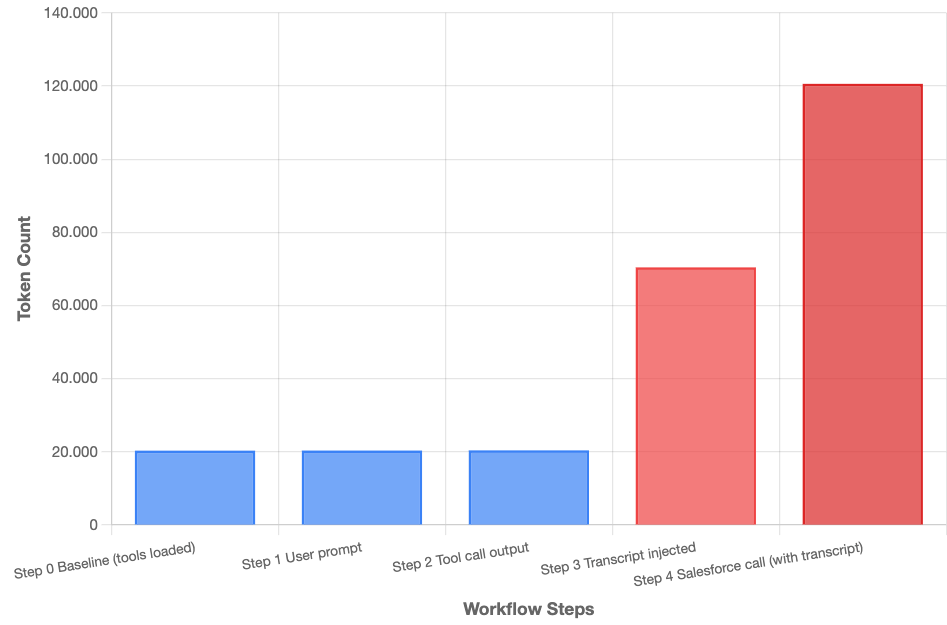
Twenty thousand tokens gone before the user types a single character. That's the cost of having 100 tools available.
Step 1: User Sends the Prompt
User: "Download the meeting transcript from Google Drive
       and attach it to the Salesforce lead."
Token count:
┌─────────────────────────────────────────────────────────┐
│  STEP 1: USER PROMPT                                    │
├─────────────────────────────────────────────────────────┤
│  Previous context                      20,346 tokens    │
│  User prompt                           25 tokens        │
├─────────────────────────────────────────────────────────┤
│  CONTEXT SIZE:                         20,371 tokens    │
│  INPUT TOKENS THIS TURN:               20,371 tokens    │
└─────────────────────────────────────────────────────────┘
Step 2: LLM Decides to Call Google Drive
The LLM analyzes the request and generates a tool call:
{
  "tool": "gdrive.getDocument",
  "arguments": {
    "documentId": "abc123-meeting-notes"
  }
}
Token count:
┌─────────────────────────────────────────────────────────┐
│  STEP 2: LLM GENERATES TOOL CALL                        │
├─────────────────────────────────────────────────────────┤
│  Output tokens (tool call)             50 tokens        │
├─────────────────────────────────────────────────────────┤
│  RUNNING TOTAL INPUT:                  20,371 tokens    │
│  RUNNING TOTAL OUTPUT:                 50 tokens        │
└─────────────────────────────────────────────────────────┘
Step 3: MCP Transport (Free!)
The client sends the request to the Google Drive MCP server. The server fetches the document. This part costs nothing in LLM tokens—it's just JSON moving between processes.
┌─────────────────────────────────────────────────────────┐
│  STEP 3: MCP TRANSPORT                                  │
├─────────────────────────────────────────────────────────┤
│  Client → Server (JSON-RPC)            0 tokens         │
│  Server executes (API call)            0 tokens         │
│  Server → Client (JSON-RPC)            0 tokens         │
├─────────────────────────────────────────────────────────┤
│  TRANSPORT COST:                       0 tokens         │
└─────────────────────────────────────────────────────────┘
Step 4: Tool Result Injected Into Context
Here's where it gets expensive. The meeting transcript is 50,000 tokens. The entire thing gets injected into the LLM's context:
┌─────────────────────────────────────────────────────────┐
│  STEP 4: TOOL RESULT INJECTION                          │
├─────────────────────────────────────────────────────────┤
│  Previous context                      20,371 tokens    │
│  Tool call (from step 2)               50 tokens        │
│  Tool result (full transcript)         50,000 tokens    │
├─────────────────────────────────────────────────────────┤
│  CONTEXT SIZE:                         70,421 tokens    │
│  INPUT TOKENS THIS TURN:               70,421 tokens    │
└─────────────────────────────────────────────────────────┘
We jumped from 20,000 to 70,000 tokens in one step.
Step 5: LLM Calls Salesforce
Now the LLM needs to attach this transcript to Salesforce. Here's the problem: to pass the transcript to the Salesforce tool, the LLM must include it in the tool call arguments. That means generating 50,000 output tokens:
{
  "tool": "salesforce.updateRecord",
  "arguments": {
    "objectType": "Lead",
    "recordId": "00Q5f000001abc",
    "data": {
      "Notes": "Meeting notes from Q4 planning session...[entire 50,000 token transcript]..."
    }
  }
}
Token count:
┌─────────────────────────────────────────────────────────┐
│  STEP 5: LLM GENERATES SALESFORCE CALL                  │
├─────────────────────────────────────────────────────────┤
│  Output tokens (tool call with data)   50,050 tokens    │
├─────────────────────────────────────────────────────────┤
│  RUNNING TOTAL INPUT:                  70,421 tokens    │
│  RUNNING TOTAL OUTPUT:                 50,100 tokens    │
└─────────────────────────────────────────────────────────┘
Step 6: Final Response
After Salesforce confirms the update, the LLM generates a response:
┌─────────────────────────────────────────────────────────┐
│  STEP 6: FINAL RESPONSE                                 │
├─────────────────────────────────────────────────────────┤
│  Previous context                      70,421 tokens    │
│  Salesforce result                     100 tokens       │
│  LLM response to user                  50 tokens        │
├─────────────────────────────────────────────────────────┤
│  FINAL CONTEXT SIZE:                   70,571 tokens    │
│  FINAL OUTPUT:                         50,150 tokens    │
└─────────────────────────────────────────────────────────┘
The Final Tally
┌─────────────────────────────────────────────────────────┐
│  COMPLETE WORKFLOW SUMMARY                              │
├─────────────────────────────────────────────────────────┤
│  Tool definitions (upfront)            20,000 tokens    │
│  System prompt                         346 tokens       │
│  User interaction                      25 tokens        │
│  Transcript (input)                    50,000 tokens    │
│  Transcript (output, to Salesforce)    50,000 tokens    │
│  Tool calls & responses                300 tokens       │
├─────────────────────────────────────────────────────────┤
│  TOTAL INPUT TOKENS:                   ~70,500 tokens   │
│  TOTAL OUTPUT TOKENS:                  ~50,200 tokens   │
│  GRAND TOTAL:                          ~120,700 tokens  │
└─────────────────────────────────────────────────────────┘
A simple two-step workflow consumed 120,000 tokens. The transcript passed through the LLM twice—once coming in from Google Drive, once going out to Salesforce.
What Could This Have Cost?
At Claude Sonnet 4.5 pricing ($3/million input, $15/million output):
- Input: 70,500 × $3/1M = $0.21
- Output: 50,200 × $15/1M = $0.75
- Total: $0.96 for one simple task
Run this 100 times a day across a team, and you're looking at real money.
The Two Bloat Problems
The demo above illustrates two distinct problems that compound at scale.
Problem 1: Tool Definition Bloat
Traditional MCP clients load every available tool into the context window upfront. The LLM needs to "see" what's available before it can decide what to use.
Each tool definition includes:
- Tool name
- Description of what it does
- Full JSON Schema for input parameters
- Often: output schema, examples, constraints
Here's what a single tool definition might look like when serialized:
Tool: salesforce.updateRecord
Description: Updates a record in Salesforce CRM with the specified
             field values. Supports all standard and custom objects.

Input Schema:
  objectType (required, string): The Salesforce object type
    Examples: "Lead", "Contact", "Opportunity", "Account"
  recordId (required, string): The 18-character Salesforce record ID
  data (required, object): Key-value pairs of fields to update
    Properties can include any valid field for the object type

Returns: Updated record object with confirmation status
That's roughly 100-150 tokens for a moderately complex tool. Enterprise APIs with nested objects, enums, and detailed descriptions can hit 300+ tokens per tool.
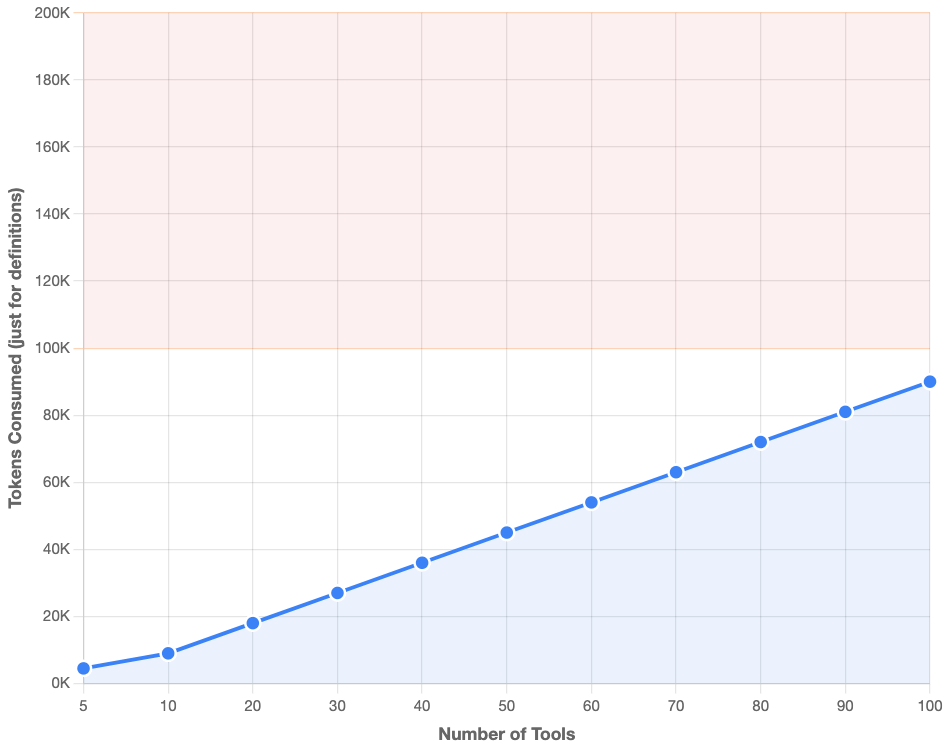
The scaling problem is linear:
Tools AvailableApproximate Tokens10 tools1,500 tokens50 tools7,500 tokens100 tools15,000 tokens200 tools30,000 tokens400 tools60,000 tokens1,000 tools150,000 tokens
At 400 tools, you've consumed 60,000 tokens before the conversation starts. At 1,000 tools, you might exceed the context window entirely.
Input schemas are the biggest culprit. Analysis shows they represent 60-80% of total token usage in tool definitions. Complex nested objects with validation rules, enums, and descriptions add up quickly.
Problem 2: Tool Result Bloat
This is the multiplicative problem from our demo. When tools return data, that data flows through the LLM's context—and often flows out again.
The pattern:
- Tool A returns large result → Injected into context (input tokens)
- LLM must reference that data to call Tool B → Included in output (output tokens)
- The same data is now counted twice
In our Google Drive → Salesforce example, the 50,000-token transcript appeared in context as input AND in the tool call as output. That's 100,000 tokens for moving one document.
Multi-step workflows multiply the problem:
5-step workflow with 10,000-token intermediate results:

Step 1: Retrieve document      → 10,000 input tokens
Step 2: Pass to processor      → 10,000 output + 10,000 input tokens
Step 3: Pass to formatter      → 10,000 output + 10,000 input tokens
Step 4: Pass to validator      → 10,000 output + 10,000 input tokens
Step 5: Save result            → 10,000 output tokens

Total: 50,000 input + 40,000 output = 90,000 tokens
The data keeps bouncing through the LLM's context at every step.
Why This Is a Core Constraint
These aren't implementation bugs—they're built into how MCP clients work with LLMs:
- LLMs need tool visibility. The model can't call tools it doesn't know about. Definitions must live in context.
- LLMs can't directly pass data between tools. Everything flows through the context window. There's no "direct pipe" from one tool's output to another tool's input.
- Context windows are finite. Claude Sonnet 4.5 has 200,000 tokens. Fill half with tool definitions, and you have limited room for actual work.
Understanding these constraints points toward solutions: load tools on-demand instead of upfront, execute operations outside the LLM context, or route data directly between tools without passing through the model.
What This Means for Your MCP Setup
Now you know where the tokens go:
- Tool definitions: Loaded upfront, scaling linearly with tool count
- Tool results: Injected into context, often multiplied across workflow steps
- Transport layer: Free—JSON-RPC costs nothing
The MCP protocol itself is efficient. The token consumption comes from how clients load tools and pass data through the LLM.
The Path Forward
The good news: solutions exist. The industry has developed approaches that reduce token usage by 96-99% while maintaining reliability:
Hierarchical routing replaces hundreds of tool definitions with two meta-tools. The LLM discovers and describes tools on-demand instead of loading everything upfront.
Code execution moves data operations outside the context window entirely. The LLM writes code that executes in a sandbox, with only summaries returning to context.
Both approaches address the core constraints we covered—they just take different paths.
Next Steps
For cost analysis, team management challenges, and detailed comparisons of these approaches, read our companion article: MCP Token Limits: The Hidden Cost of Tool Overload.
To see hierarchical routing in action, explore DeployStack's platform where on-demand toolsets are built into the MCP hosting layer.
The technical understanding you've gained here is the foundation. Knowing exactly where tokens flow is the first step to controlling them.