About DeployStack
DeployStack is an open source MCP hosting platform. Deploy any MCP server from GitHub to an HTTP endpoint in 30 seconds — no Docker, no mcp-remote, no DevOps. Built for workflow automation platforms like n8n, Dify, Voiceflow, and Langflow that need HTTP endpoints. Browse our curated catalog or deploy your own repo. From solo developers to large teams, DeployStack scales with you — credential vault, role-based access, and 98% token reduction included.

MCP Hosting, Simplified
Deploy MCP servers from GitHub as HTTP endpoints for workflow automation platforms. Open source (AGPL-3.0), self-hostable, and built to scale from solo developers to large teams.
Deploy MCP servers from GitHub
Point DeployStack at any GitHub repo and get an HTTP endpoint in 30 seconds. No Docker, no mcp-remote, no DevOps. Auto-deploy on git push.
Works with n8n, Dify, Voiceflow, Langflow
Workflow automation platforms need HTTP endpoints, but most MCP servers are stdio-only. DeployStack bridges the gap — paste a URL into your platform and go.
Curated catalog + credential vault
Browse popular MCP servers and deploy with one click, or bring your own repo. Encrypted credential vault keeps API keys secure with role-based access control.
Scales from solo to large teams
98% token reduction via hierarchical routing keeps AI tools fast. Team management, audit logging, and per-user isolation grow with you from solo developer to enterprise.
Centralized credential management
No more API keys scattered in Slack or local .env files. Encrypted vault for the whole team with role-based access control.
Visibility into team tool usage
See which MCP tools your team uses, by whom, and how often across your organization. Complete audit trails for compliance.
Fast onboarding for new developers
One URL gets new team members access to all MCP servers in minutes, not hours. No installation, no configuration drift.
Token optimization for responsive AI
98% token reduction means your AI tools stay fast and responsive, even with 100+ MCP servers. No more tool limits.
How We're Different
The only open source MCP hosting platform with built-in credential vault, token optimization, and team management.
DeployStack
Open source hosting
FastMCP Cloud
Proprietary SaaS
DIY (mcp-remote / Docker)
Manual setup
Deployment
| Feature | DeployStack | FastMCP Cloud | DIY (mcp-remote / Docker) |
|---|---|---|---|
| GitHub to HTTP in 30 seconds | Yes | Yes | No |
| Auto-deploy on git push | Yes | Yes | No |
| Curated server catalog | Yes | No | No |
| Deploy any GitHub repo | Yes | Yes | Yes |
Platform & Licensing
| Feature | DeployStack | FastMCP Cloud | DIY (mcp-remote / Docker) |
|---|---|---|---|
| Open source (AGPL-3.0) | Yes | No | Varies |
| Self-hosting option | Yes | No | Yes |
| No local install required | Yes | Yes | No |
Team & Security
| Feature | DeployStack | FastMCP Cloud | DIY (mcp-remote / Docker) |
|---|---|---|---|
| Credential vault (AES-256) | Yes | No | No |
| Role-based access control | Yes | No | No |
| Team isolation (per-user) | Yes | No | No |
| Audit logging | Yes | No | No |
Observability
| Feature | DeployStack | FastMCP Cloud | DIY (mcp-remote / Docker) |
|---|---|---|---|
| Audit logging | Yes | No | No |
| Token analytics dashboard | Yes | No | No |
| Tool usage tracking | Yes | No | No |
| Cost estimation | Yes | No | No |
Developer Experience
| Feature | DeployStack | FastMCP Cloud | DIY (mcp-remote / Docker) |
|---|---|---|---|
| Zero installation | Yes | Yes | No |
| Single URL setup | Yes | Yes | No |
| Token optimization | 98% reduction | No | No |
| Open source | Yes | No | Varies |
Feature comparison
DeployStack
Open source hosting
Deployment
- GitHub to HTTP in 30 seconds
- Yes
- Auto-deploy on git push
- Yes
- Curated server catalog
- Yes
- Deploy any GitHub repo
- Yes
Platform & Licensing
- Open source (AGPL-3.0)
- Yes
- Self-hosting option
- Yes
- No local install required
- Yes
Team & Security
- Credential vault (AES-256)
- Yes
- Role-based access control
- Yes
- Team isolation (per-user)
- Yes
- Audit logging
- Yes
Observability
- Audit logging
- Yes
- Token analytics dashboard
- Yes
- Tool usage tracking
- Yes
- Cost estimation
- Yes
Developer Experience
- Zero installation
- Yes
- Single URL setup
- Yes
- Token optimization
- 98% reduction
- Open source
- Yes
FastMCP Cloud
Proprietary SaaS
Deployment
- GitHub to HTTP in 30 seconds
- Yes
- Auto-deploy on git push
- Yes
- Curated server catalog
- No
- Deploy any GitHub repo
- Yes
Platform & Licensing
- Open source (AGPL-3.0)
- No
- Self-hosting option
- No
- No local install required
- Yes
Team & Security
- Credential vault (AES-256)
- No
- Role-based access control
- No
- Team isolation (per-user)
- No
- Audit logging
- No
Observability
- Audit logging
- No
- Token analytics dashboard
- No
- Tool usage tracking
- No
- Cost estimation
- No
Developer Experience
- Zero installation
- Yes
- Single URL setup
- Yes
- Token optimization
- No
- Open source
- No
DIY (mcp-remote / Docker)
Manual setup
Deployment
- GitHub to HTTP in 30 seconds
- No
- Auto-deploy on git push
- No
- Curated server catalog
- No
- Deploy any GitHub repo
- Yes
Platform & Licensing
- Open source (AGPL-3.0)
- Varies
- Self-hosting option
- Yes
- No local install required
- No
Team & Security
- Credential vault (AES-256)
- No
- Role-based access control
- No
- Team isolation (per-user)
- No
- Audit logging
- No
Observability
- Audit logging
- No
- Token analytics dashboard
- No
- Tool usage tracking
- No
- Cost estimation
- No
Developer Experience
- Zero installation
- No
- Single URL setup
- No
- Token optimization
- No
- Open source
- Varies
Save Time with DeployStack
From hours of configuration hell to minutes of productivity
Before DeployStack: Hours of Pain
The typical developer journey with MCP setup
Find an MCP Server
Searching GitHub for MCP servers, reading READMEs, figuring out which ones actually work with your platform.
Duration: 1 hour
Local Setup
Installing Node.js, Docker, or mcp-remote. Debugging why npx hangs, why ports conflict, why nothing connects.
Duration: 3 hours
HTTP Endpoint Problem
Your workflow platform (n8n, Dify, Voiceflow) needs an HTTP URL. The MCP server only supports stdio. Now what?
Duration: 4 hours
DIY Hosting
Setting up Fly.io, Railway, or a VPS. Writing Dockerfiles, configuring reverse proxies, managing SSL certificates.
Duration: 4 hours
Maintenance
Updating dependencies, redeploying after changes, monitoring uptime. Every MCP server is another thing to maintain.
Duration: 2+ hours
With DeployStack: 30 Seconds to Done
GitHub repo to HTTP endpoint, ready for your workflows
Pick a Server
Browse the curated catalog or paste your GitHub repo URL. Select the MCP server you need.
Duration: 10 seconds
Deploy
Click deploy. DeployStack builds your server and gives you an HTTP endpoint. Auto-deploys on every git push.
Duration: 30 seconds
Use It
Paste the URL into n8n, Dify, Voiceflow, Claude, Cursor — any tool that supports MCP over HTTP.
Duration: 10 seconds
Core Features
Zero Installation Friction
Just add a single URL to your MCP Client - no CLI tools, no local processes, no configuration complexity. It works like OpenAI API or Claude API with a familiar HTTPS pattern, giving you instant access without any system dependencies or setup.
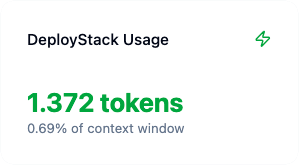
Context Window Optimization
Our hierarchical router reduces token consumption by over 90%, allowing you to scale from 3 to 100+ MCP servers without performance degradation. Instead of exposing 150+ individual tools, we expose just 2 meta-tools, and our token analytics dashboard shows near real-time context usage.
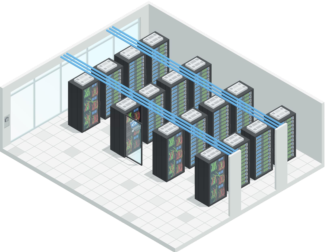
Deploy Anywhere: Cloud or Behind Your Firewall
Run satellites on-premise to access your PostgreSQL databases, internal APIs, or file systems behind your corporate network, or on your own cloud infrastructure. Your choice - deploy where your data lives, keep credentials secure, and maintain complete control over sensitive resources.
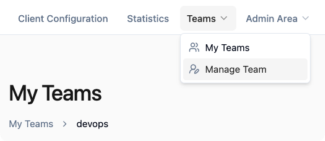
Enterprise Security & Isolation
Complete team isolation with resource boundaries keeps your data and MCP Server secure. Features include a secure credential vault with encrypted API key storage, OAuth2 authentication with role-based access control, plus audit trails and compliance features.
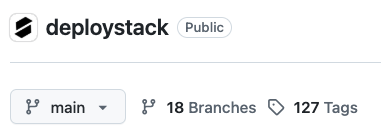
Open Source Foundation
Self-host the entire platform on your own infrastructure with Docker deployment options for complete control. Built on transparency, not vendor lock-in, we believe in community collaboration and open development.
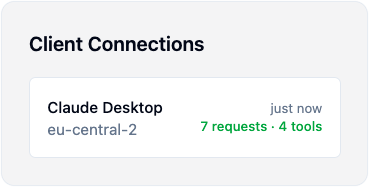
Organizational Visibility
Track which developers use which MCP tools and how often, monitor expensive API usage to optimize costs, and get complete visibility into AI tool adoption patterns. Our usage analytics help you identify the most valuable tools for your team.
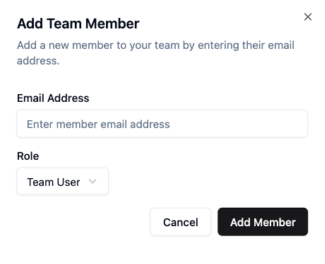
Instant Team Onboarding
New team members just add one URL to get immediate access - no installation, registration, or token management required. This ensures consistent tool access across all team members while eliminating configuration drift and setup complexity.
Let's Build the Future of MCP Together!
We'd love to collaborate with developers who share our vision for simplifying MCP server deployment.