DeployStack: How We Solved MCP's Two Fatal Problems - Credential Chaos and Context Window Overload

DeployStack turns MCP from "complex to set up" into "just add a URL" by solving credential management (encrypted team vault with automatic injection) and context window consumption (hierarchical router reducing tokens by 99.5%). Teams get access to 600+ MCP servers with zero installation, centralized security, and the ability to scale without hitting performance limits.
The Breaking Point: 30 Developers, 15 MCP Servers, and Secrets in Slack
Our DevOps team wanted to use AI agents across our projects. The use cases were obvious - database queries with SQLite and PostgreSQL MCP servers, documentation with Context7, complex reasoning with Sequential Thinking, project management through Jira and GitHub integrations. Our frontend team needed the Figma MCP server. We had 15 different MCP servers that made perfect sense for our workflows - Yes, we build also some custom MCP servers for our own use-cases. They make sense only in our context.
Outcome: we had almost 30 developers who needed access to these tools.
The first developer to set up an MCP server would get it working locally, then paste their configuration into Slack. API keys included. Database credentials visible to everyone from our internal DevOps team. GitHub tokens sitting in plain text in a shared channel. Someone would copy-paste the config, realize it didn't work on their machine because the file paths were different, ask for help, and we'd debug it again.
The whole thing felt like we spent more time configuring MCP servers than actually getting any benefit from them.
Then the second problem appeared. Developers who successfully configured multiple MCP servers started reporting that Claude was giving worse responses. The LLM seemed confused, slower, less accurate. We investigated and found the issue: each MCP server was consuming thousands of tokens just by being loaded. With 10 servers active, we were burning through 75,000 tokens before Claude even started working on the actual task.
That's when we knew MCP had two fatal adoption problems that needed solving together.
Problem 1: Credential Chaos Across Teams
MCP's architecture assumes each developer manages their own local configuration. This works fine for solo developers experimenting with one or two servers. It breaks completely when you try to scale across a team.
The Reality of Managing MCP Credentials
Here's what MCP configuration looks like for a single server (example):
{
  "mcpServers": {
    "postgres": {
      "command": "npx",
      "args": ["-y", "@modelcontextprotocol/server-postgres"],
      "env": {
        "POSTGRES_CONNECTION_STRING": "postgresql://user:password@localhost:5432/db"
      }
    }
  }
}
Every developer needs to manually create this configuration file. Every developer needs their own copy of the credentials. Every developer needs to update their local file when credentials rotate. Every developer needs to maintain different file paths for their specific machine setup.
Multiply this by 15 MCP servers and 30 developers. You get 450 individual configuration points that need to stay synchronized.
What Happens When You Scale Beyond 5 Developers
At 5 developers, you can manage this with documentation and patience. Someone creates a wiki page with all the configurations. Developers copy-paste and adjust for their setups. When credentials change, you update the wiki and ping everyone in Slack.
At 10 developers, the wiki is always outdated. Half the team has working configs, half doesn't. You spend 2 hours onboarding each new developer just to get their MCP servers configured. Someone leaves the company and you have no idea which credentials they had access to.
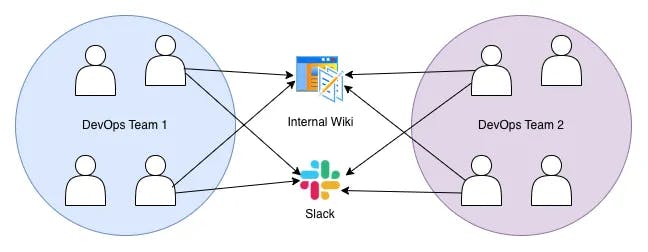
At 30 developers, you've lost control completely. You have no visibility into who's using which MCP servers. You can't rotate credentials without breaking everyone's setup. New developers take a full day just to configure their tools. Configuration drift means every developer has a slightly different setup, leading to "works on my machine" problems.
The Security Nightmare
The credential management problem isn't just annoying - it's a security incident waiting to happen.
API keys in Slack messages. Database passwords in documentation. GitHub tokens sitting in local JSON files. Every developer has full access to production credentials because there's no way to give them anything else. When someone leaves, you have no audit trail of which systems they could access.
It must be said at this point: the MCP protocol was designed to run locally for security reasons. This is a good design decision, which I don't want to criticize here.
Compliance teams look at this setup and see a nightmare. Security teams flag it immediately. But what's the alternative? MCP doesn't provide any native credential management, and the local configuration method makes centralized secrets management nearly impossible.
Problem 2: Context Window Consumption Crisis
While we were fighting or managing credentials, developers started complaining about something else: Claude was getting dumber.
The 75,000 Token Problem
We tracked down the issue by looking at token consumption. Here's what we found:
Claude Sonnet 4.0 / 4.5 Context Window: 200,000 tokens total
Token consumption with 10 MCP servers:
- GitHub MCP: ~8,500 tokens
- PostgreSQL MCP: ~7,200 tokens
- SQLite MCP: ~6,800 tokens
- Context7 MCP: ~8,100 tokens
- Sequential Thinking: ~4,200 tokens
- Jira MCP: ~9,300 tokens
- Figma MCP: ~7,400 tokens
- Notion MCP: ~8,900 tokens
- Slack MCP: ~7,200 tokens
- Filesystem MCP: ~7,400 tokens
Total: 75,000 tokens consumed before any work begins.
That's 37.5% of the context window gone just by loading the tools. Claude has 125,000 tokens left for understanding your question, thinking through the answer, and generating a response. For complex tasks, that's not enough.
Why You Can't Use More Than 8 MCP Servers
The degradation isn't linear. Research shows that LLM accuracy drops significantly when tools exceed 20-40 items. With 10 MCP servers providing 128 tools, Claude has to:
- Understand which tools are relevant to your question
- Filter through 128 options to find the right ones
- Remember what each tool does
- Decide when to use which tool
- Track the context of previous tool calls
All while working with a reduced context window. The result? Claude makes worse decisions about which tools to use, gets confused about tool capabilities, and sometimes just gives up and provides a basic response without using any tools.
We saw this in practice. Developers would disable half their MCP servers just to get better responses. They'd keep only the 4-5 most critical tools active and manually re-enable others when needed. This defeated the entire purpose of having a rich toolkit available.
The Cursor 40-Tool Limit
Cursor enforces a hard limit of 40 tools. The reason is simple: their testing showed that performance degrades beyond this threshold. With 40 tools, Claude can still reason effectively about which to use. At 50, 60, or 128 tools, the quality drops noticeably.
This creates an impossible choice: either limit yourself to 3-4 MCP servers (40 tools divided by ~12 tools per server), or accept degraded performance.
Our team needed 10 different MCP servers. There was no way to fit that into 40 tools. We had to build something different.
The Hidden Third Problem: Multi-Machine Configuration Fun
This one caught us by surprise. Even solo developers hit configuration issues when they work across multiple machines.
You configure MCP servers on your work laptop. Everything works great. Then you go home, open your personal laptop, and nothing works. You need to manually copy the configuration, adjust file paths, set up environment variables again, and hope you remembered all the credentials.
Same issue when you get a new machine. Or when you want to work from a different computer. Or when you need to test something in a different environment. Every machine needs its own local configuration, and keeping them synchronized is your responsibility.
We had developers maintaining three different configurations: work laptop, home desktop, and backup laptop. Each time they added a new MCP server or updated credentials, they had to update all three. Sometimes they'd forget, leading to confusion about why something worked on one machine but not another.
The local-first method that works well for solo experimentation becomes a maintenance fun when you need consistency across machines or teams.
How We Built DeployStack
We needed something that addressed all three problems simultaneously: credential management, context window consumption, and multi-machine synchronization. Building separate tools for each problem would just create more complexity.
Design Principle: Zero Installation
The first decision was the most important: no local installation required.
Every other MCP management tool requires you to install a CLI tool, manage local processes, and configure localhost connections. We looked at this method and realized it was part of the problem. Installation friction kills adoption. "Install our CLI tool" is a barrier that most developers won't cross, especially when they're just trying to experiment with MCP.
Instead, we built DeployStack as a managed service. You add a single URL to your MCP configuration and everything works. No npm packages to install. No local processes to manage. No port conflicts or process restarts.

Satellite URL:
{
  "mcpServers": {
    "deploystack": {
      "type": "http",
      "url": "https://satellite.deploystack.io/mcp",
      "headers": {
        "Authorization": "Bearer your-team-token"
      }
    }
  }
}
That's it. One URL replaces 10 different MCP server configurations.
The Satellite Architecture
We call our infrastructure "satellites" because they work like edge workers - deployed close to users, managing MCP servers on-demand, isolated per team.
When Claude calls your MCP configuration, the request goes to our satellite infrastructure:
- Authentication: Satellite validates your team token via OAuth 2.1
- Configuration Lookup: Retrieves your team's MCP server configurations from the control plane
- Credential Injection: Automatically injects stored credentials into the appropriate MCP servers
- Process Management: Spawns MCP server processes on-demand with team isolation
- Tool Discovery: Returns only the tools you actually need for this request
- Execution: Routes tool calls to the correct MCP server process
- Response: Returns results through standard HTTP response
The satellite handles all the complexity. You get a simple HTTPS API that works like any other service.
Three-Tier Configuration System
The architecture that made everything work was our three-tier configuration system:
Template Level (Global Admins):
- Define base MCP server configurations
- Set which parts can be customized
- Lock down security-critical settings
Team Level (Team Admins):
- Configure shared credentials (API keys, database passwords)
- Set team-wide defaults
- Control what team members can customize
User Level (Individual Developers):
- Customize personal settings (file paths, preferences)
- Override team defaults where allowed
- Maintain consistency across their machines
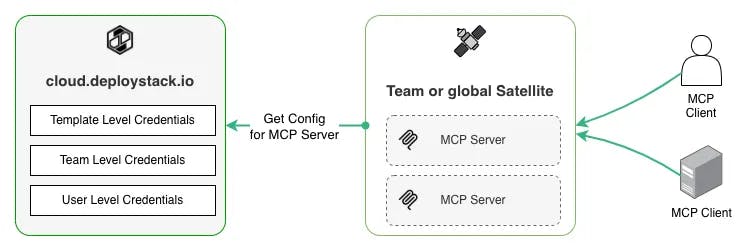
This solves the credential problem (team-level secure storage), the configuration problem (personal customization without losing team settings), and the multi-machine problem (all settings stored in the cloud, synchronized automatically).
Fix 1: Centralized Credential Management
The first thing we fixed was getting credentials out of Slack messages and local JSON files.
Team-Based Credential Vault
DeployStack provides an encrypted credential vault at the team level. Team administrators configure MCP servers once through the web dashboard at cloud.deploystack.io. They add the necessary credentials - API keys, database passwords, OAuth tokens - and those credentials are encrypted and stored securely.
No individual developer ever sees the actual credential values. They don't need to. When a developer uses an MCP server, the satellite infrastructure automatically injects the appropriate credentials at runtime. The credentials never touch the developer's machine, never appear in configuration files, and never get pasted into Slack.
This is similar to how CI/CD systems handle secrets. GitHub Actions doesn't expose your secrets to individual workflow runs - it injects them securely at runtime. We apply the same pattern to MCP servers.
Automatic Credential Injection
Here's what happens when a developer uses an MCP server that requires credentials:
- Developer makes a request through Claude using the DeployStack satellite URL
- Satellite authenticates the developer's team token
- Satellite retrieves the team's MCP server configurations from the control plane
- Satellite decrypts the credentials for the requested MCP server
- Satellite spawns the MCP server process with credentials injected as environment variables
- MCP server executes the requested tool with proper authentication
- Results return to the developer through Claude
The developer's experience is simple and transparent. They just use the MCP tools. The credential management happens invisibly in the infrastructure.
No More Slack Messages with API Keys
At the end it was about simplifying our lives. We don't want to manage JSON files or/and credentials. That's simply not our job. We want to, or should, develop software.
So: No more credential sharing in Slack. No more wiki pages with passwords. No more onboarding sessions where new developers manually configure 15 different API keys.
When someone joins the team, we add them to the appropriate DeployStack team. They get a single OAuth token. That token gives them access to all the MCP servers the team has configured, with the appropriate credentials automatically available. Setup time went from a full day to under 5 minutes.
When someone leaves, we remove them from the team. Their access to all MCP servers stops immediately. No credential rotation needed. No wondering which systems they could access. Clean audit trail of exactly what they used.
When credentials need to rotate, a team administrator updates them once in the DeployStack dashboard. Every developer automatically uses the new credentials on their next request. No coordination required. No individual updates needed.
Fix 2: Intelligent Context Window Optimization
Solving the credential problem made MCP usable for teams. But we still had the context window consumption issue. We needed a way to use 15 MCP servers without burning through 75,000 tokens at startup.
The Hierarchical Router Pattern
The answer came from studying how developers actually use MCP tools. They don't need all 128 tools loaded into context at once. They need the right tools for their specific task.
When a developer asks Claude to "create a GitHub issue for this bug," Claude only needs access to GitHub tools. It doesn't need the PostgreSQL tools, the Figma tools, or the Jira tools. But with traditional MCP configuration, all those tools are loaded anyway.
We built a hierarchical router that changes how tools are exposed to Claude. Instead of loading all 128 tools from 10 MCP servers, we expose exactly 2 meta-tools:
Tool 1: discover_mcp_tools(query)
- Takes a natural language query describing what tools are needed
- Searches across all team MCP servers
- Returns only relevant tool paths with descriptions
Tool 2: execute_mcp_tool(tool_path, arguments)
- Takes a tool path from the discovery results
- Routes the request to the correct MCP server
- Executes the tool and returns results
This is how it works in practice:
- Developer asks: "Create a GitHub issue for this bug"
- Claude calls `discover_mcp_tools("GitHub issue creation")`
- Router searches team MCP servers, finds relevant GitHub tools
- Router returns: `github:create_issue`, `github:update_issue`, `github:search_issues`
- Claude decides `github:create_issue` is the right tool
- Claude calls `execute_mcp_tool("github:create_issue", {title: "...", body: "..."})`
- Router spawns GitHub MCP server process, executes tool, returns result
Claude never sees the other 125 tools. It discovers only what it needs, when it needs it.
From 75,000 Tokens to 350 Tokens
The token reduction is dramatic:
Traditional Approach:
- 15 MCP servers × ~10 tools each = ~128 tools exposed
- 128 tools × ~500 tokens per tool = ~75,000 tokens
- Context consumed: 37.5%
Hierarchical Router Approach:
- 2 meta-tools exposed to Claude
- 2 tools × 175 tokens = 350 tokens
- Context consumed: 0.175%
That's a 99.5% reduction in context window consumption.
The actual token count varies based on how many tools the router returns from discovery, but even with generous discovery results (returning 10 relevant tools), you're looking at around 5,000 tokens total. Still 93% better than loading everything upfront.
How It Works: Two Tools Replace Everything
The beauty of this method is that it scales infinitely. Whether you have 5 MCP servers or 50, Claude always sees exactly 2 tools in its context. The complexity is hidden behind the router.
This means you can add new MCP servers without degrading Claude's performance. You can turn on specialty tools for specific use cases without worrying about context bloat. You can give different teams access to different server combinations without each team hitting tool limits.
Our team went from using 5-8 MCP servers (to stay under the performance cliff) to actively using all 15 servers simultaneously. Claude's response quality improved because it had more context available for actual reasoning instead of tool descriptions.
What You Get Today
DeployStack is live and free at cloud.deploystack.io. Here's what you can do right now:
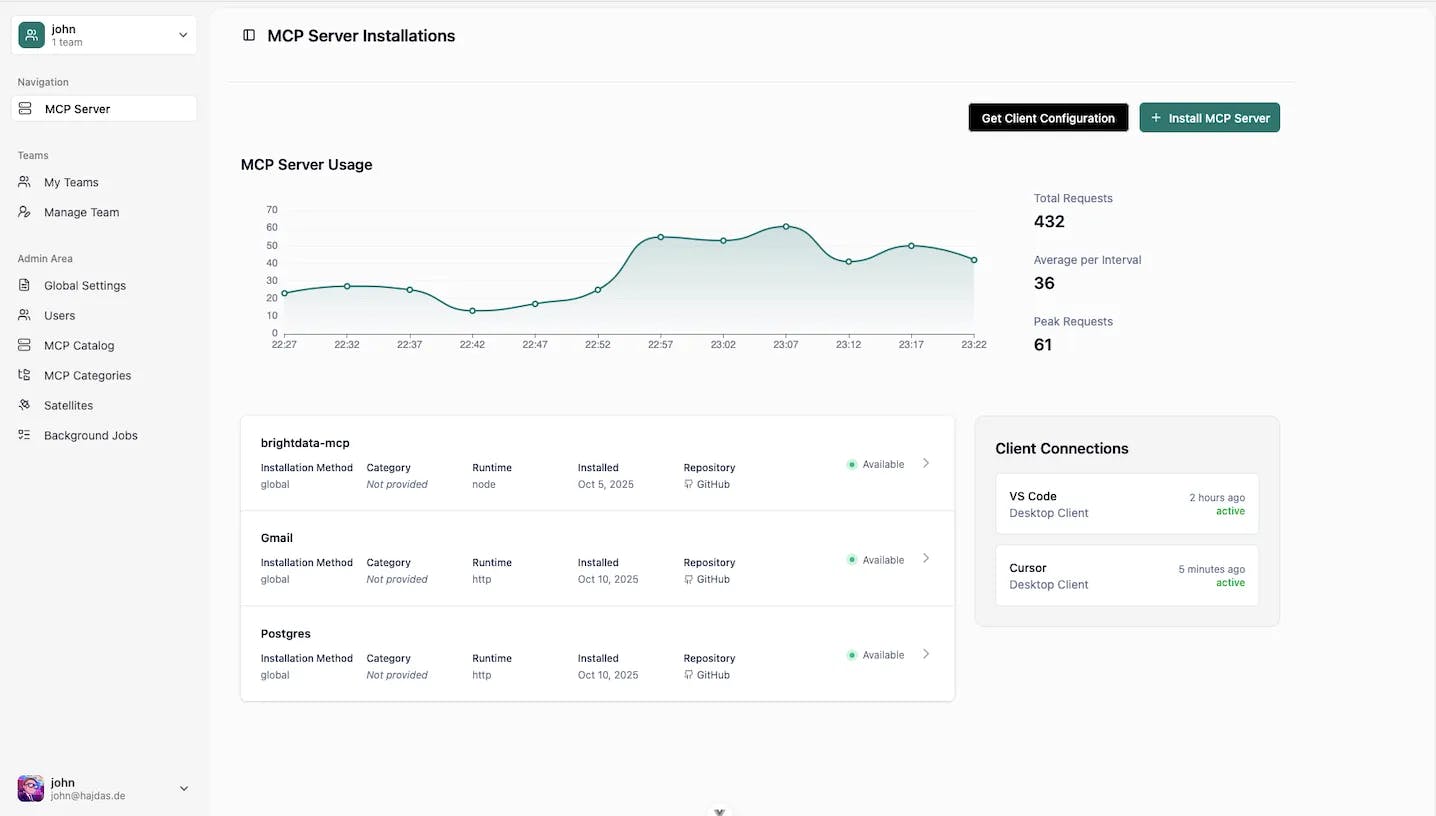
600+ MCP Servers Ready to Use
We've integrated the official MCP Registry, giving you instant access to over 600 pre-configured MCP servers. Browse the catalog, click install, configure credentials, and the server is available to your entire team.
The catalog includes official servers from Anthropic, community servers, and popular integrations:
- Database tools (PostgreSQL, SQLite, MySQL)
- Project management (GitHub, Jira, Linear)
- Documentation (Notion, Context7)
- Communication (Slack, Discord)
- Development tools (Sequential Thinking, Filesystem)
- Design tools (Figma)
- And hundreds more
Each server includes documentation, version tracking, and GitHub integration for automatic updates.
Zero Installation for Your Team
Add one URL to your MCP configuration. Every team member uses the same URL with their OAuth token. No local installations. No CLI tools. No process management.
{
  "mcpServers": {
    "deploystack": {
      "type": "http",
      "url": "https://satellite.deploystack.io/mcp",
      "headers": {
        "Authorization": "Bearer your-team-token"
      }
    }
  }
}
Works across all your machines automatically. Change computers, and your configuration follows you. Add new MCP servers through the dashboard, and they're available everywhere instantly.
Team Collaboration Built-In
Create teams, invite members, assign roles. Team administrators configure shared MCP servers and credentials. Team members get automatic access to everything they need. Role-based access control ensures the right people have the right permissions.
The three-tier configuration system means teams can enforce standards while individuals customize personal settings. Onboard new developers in minutes instead of hours. Remove access instantly when someone leaves.
Open Source and Free
The entire platform is open source under the Server Side Public License. You can see exactly how it works, contribute improvements, and deploy your own instance if needed.
The hosted version at cloud.deploystack.io is free for teams. No credit card required. We currently have Team and MCP server you can install limited. We built this to solve our own problem, and we're sharing it with the community.
Full documentation is available at docs.deploystack.io, including guides for administrators, team owners, and developers.
The Technical Stack
For developers who want to understand the implementation:
Control Plane Architecture
The control plane runs at cloud.deploystack.io and handles:
- User authentication via OAuth 2.1 (GitHub, Google)
- Team management and role-based access control
- MCP server catalog with official registry synchronization
- Configuration management (three-tier system)
- Credential vault with encryption
- Team isolation and security boundaries
Built with:
- Backend: Fastify with TypeScript, Drizzle ORM
- Frontend: Vue 3 with TypeScript
- Database: SQLite with selective encryption for credentials
- Authentication: OAuth 2.1 with token introspection
Satellite Infrastructure
The satellite service runs at satellite.deploystack.io and handles:
- MCP server process management
- Tool discovery and hierarchical routing
- Credential injection at runtime
- Team isolation via Linux namespaces and cgroups
- HTTP-based MCP transport (SSE, Streamable HTTP)
- Real-time event emission to backend
Built with:
- Runtime: Node.js with TypeScript
- Framework: Fastify with native JSON Schema validation
- Process Isolation: nsjail with resource limits (prod only)
- Transport: SSE and HTTP protocols for MCP communication
- Logging: Pino structured logging
Security and Isolation
Team isolation uses multiple layers:
- Process Isolation: Each team's MCP servers run in separate processes
- Resource Limits: CPU (0.1 core) and memory (100MB) caps per process
- Filesystem Jailing: Teams can only access their designated directories
- Credential Encryption: All sensitive data encrypted at rest
- OAuth 2.1: Modern authentication with token introspection
The satellite communicates with the backend via HTTP polling, making it firewall-friendly. This architecture supports future team satellites - customer-deployed instances that run inside corporate networks for internal resource access.
What's Next
DeployStack is in beta, and we're actively building the next layer of features based on what we learned from our internal testing with 100 users.
Team Satellites
Right now, DeployStack uses global satellites that we manage and operate. This works great for most teams, but individual organizations have a specific requirement: their MCP servers need access to internal resources.
Imagine your company database is only accessible from within your corporate network. Or you have internal APIs that aren't exposed to the internet. Or you need MCP servers that read from file systems behind your firewall.
Like this figure: DeployStack satellite can be deployed into your corporate network, and access critical data without exposing them to the internet. Satellite can be still connected to the DeployStack Control Plane (cloud.deploystack.io) since we use pooling only.
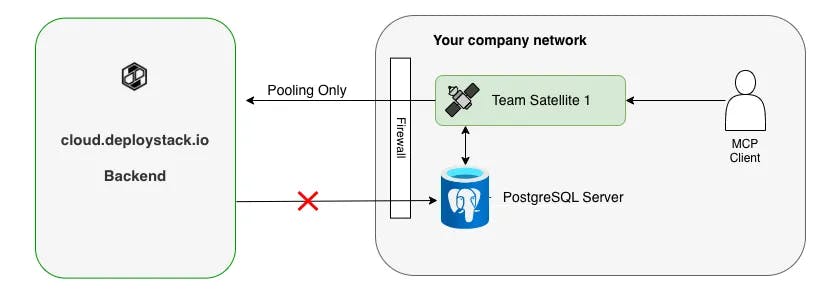
Team satellites solve this. They're customer-deployed instances that run inside your corporate network, exactly like GitHub Actions runners. They have the same security, isolation, and routing capabilities as our global satellites, but they run on your infrastructure with access to your internal resources.
We designed the satellite architecture from the start to support this deployment model. The satellite communicates with the DeployStack control plane via outbound HTTP polling, so it works behind corporate firewalls without requiring inbound connections. Your security team will appreciate that.
Advanced Token Analytics
The hierarchical router gives us visibility into exactly which tools are being used and how much context they consume. We're building analytics that show:
- Which MCP servers your team uses most frequently
- Token consumption per server, per tool, per team member
- Recommendations for disabling unused servers
- Optimization suggestions based on usage patterns
- Cost attribution if you're using usage-based LLM pricing
This visibility doesn't exist today in MCP. Teams have no idea which tools actually get used versus which ones just sit there consuming context. We're changing that.
Sidenote: this feature is not full implemented yet. We're working on this.
Community Growth
We built DeployStack to solve our own 30-developer problem, but we know the MCP ecosystem is much bigger than that. We're opening up the platform to community contributions:
- Submit your custom MCP servers to the mcp registry
- Contribute to the open source codebase
- Help us understand what features teams need most
The documentation at docs.deploystack.io covers everything contributors need and is designed for developers. If you're building MCP servers or managing AI tools for your team, we want to hear from you.
Try DeployStack Today
DeployStack is live and free at cloud.deploystack.io. Here's how to get started:
For Solo Developers
1. Sign up at cloud.deploystack.io with your GitHub account
2. Browse the catalog of 600+ MCP servers
3. Install a server (try Context7 or Sequential Thinking to start)
4. Get your OAuth token from the dashboard
5. Add the URL to your MCP configuration:
{
  "mcpServers": {
    "deploystack": {
      "type": "http",
      "url": "https://satellite.deploystack.io/mcp",
      "headers": {
        "Authorization": "Bearer your-token-here"
      }
    }
  }
}
6. Start using MCP tools in Claude - no installation required
The hierarchical router is enabled by default, so you'll immediately see the token reduction benefits.
For Teams
- Create a team in the DeployStack dashboard
- Invite team members with appropriate roles
- Install MCP servers your team needs (GitHub, Jira, databases, etc.)
- Configure credentials once at the team level
- Share the team token with your developers
Every team member adds the same URL to their configuration. They get automatic access to all team MCP servers with credentials already configured. Onboarding a new developer takes less than 5 minutes.
Resources
- Platform: https://cloud.deploystack.io
- Documentation: https://docs.deploystack.io
- GitHub: https://github.com/deploystackio/deploystack
- Discord: Join our community at https://discord.gg/42Ce3S7b3b
Open Source
The entire codebase is open source under the Server Side Public License. You can:
- See exactly how the credential vault works
- Understand the hierarchical router implementation
- Contribute improvements and bug fixes
- Deploy your own instance if needed
- Build custom MCP servers using our patterns
We built DeployStack because MCP's adoption was being killed by credential chaos and context window overload. Six months of development and internal testing with 100 users proved this method works. Now we're sharing it with the community.
If you're managing MCP servers for yourself or your team, give DeployStack a try. It's free, open source, and solves real problems we faced every day. We'd love to hear what you think.